
Beginning Bank Balance Reconciliation
On the Bank Reconciliation screen, select the Bank account that contains the Beginning Bank Statement Balance. Select  to begin the Bank Reconciliation.
to begin the Bank Reconciliation.
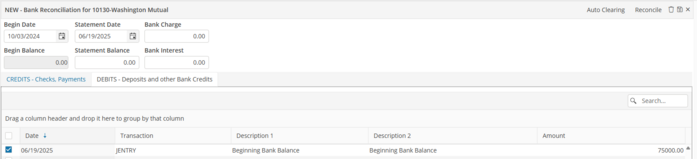
The Bank Reconciliation header will appear, enter the following:
1. The Begin Date is the statement end date from the Bank Statement.
2. The Statement Date is the statement end date from the Bank Statement.
3. The Statement Balance is the Statement Ending Bank Balance amount from the bank statement.
4. Select  to save the header.
to save the header.On the “DEBITS-Deposits & Other Bank Credits” tab, select the Beginning Balance Journal Entry.
Verify that the “Left to Clear” amount equals zero. Select  to reconcile the account.
to reconcile the account.Complete this process for each bank account.