
Closing Ratios
This report is located under Management > Sales > Closing Ratios. The Closing Ratios Report provides a listing of the number of leads created, booked, cancelled, denied, and pending, along with the percentages booked, cancelled, denied and pending for every month in a selected year.
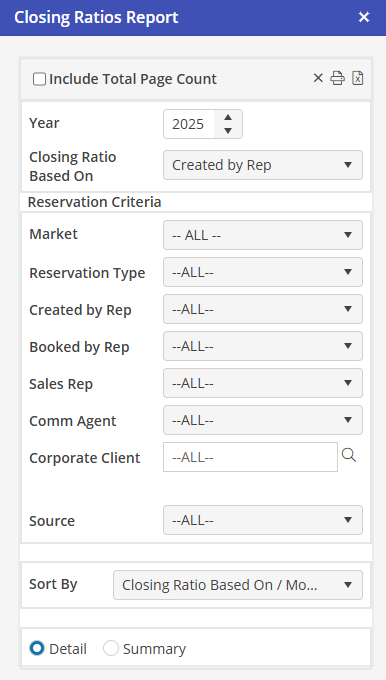
Access to the report is via the Oscar navigation bar in the Management Section. Users with security permission for Reports > Sales, will be able to access the report.
The report may be previewed, printed, or exported to an Excel spreadsheet. Note that the filter selection and any subtotals are not included in the export version of the report.
Report Sort By Options **
By Closing Ratio Based On, by Month (default)
By Month, by Closing Ratio Based On
Detail / Summary Option ** (default = Detail)
For the preview and print versions of the report, if Summary is selected, only the subtotal and grand total lines will appear on the report.
For example, if the selected “Closing Ration Based On” is Corporate Client and the selected sort option is “Closing Ratio Based On, Month,” the report will contain a single line for each Corporate Client, along with the sum of totals for all of the months for that client.
If the selected sort option is “Month, Closing Ration Based On,” the report will contain a single line for each month, along with the sum of the totals for all Corporate Clients for each month.
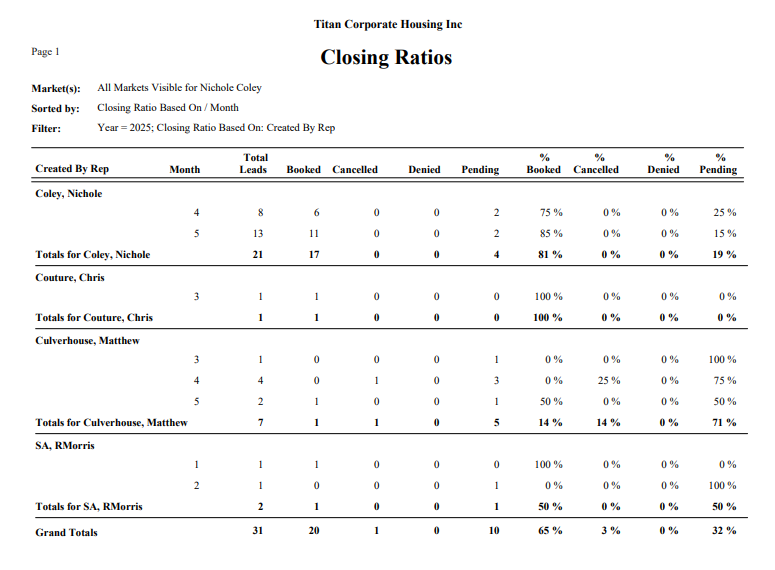
Report Fields
Closing Ratio Based On
Dependent upon selection (i.e., Market name, Corporate Client name, etc)
For created by and booked by Users and sales rep, the User last name and first name (i.e., Amozig, Mary)
Total Leads
Count of leads created (for each month / closing ratio based on) regardless of whether they have been booked, cancelled, denied, or are still pending
Booked *
Count of leads created (for each month / closing ratio based on) that are booked as of the day the report is run
Cancelled *
Count of leads created (for each month / closing ratio based on) that are cancelled as of the day the report is run
Denied *
Count of leads created (for each month / closing ratio based on) that are denied as of the day the report is run
Pending *
Total Leads minus Booked, Cancelled, and Denied
Pct Booked (Closing Ratio) - Booked divided by Total Leads
Pct Cancelled - Cancelled divided by Total Leads
Pct Denied - Denied divided by Total Leads
Pct Pending - Pending divided by Total Leads
* Note that a single lead/Reservation is included in one bucket only (booked, cancelled, denied, or pending). Thus, the sum of booked, cancelled, denied, and pending always equals the total leads.
Report Footers
The preview and print versions of the report contain subtotals for all numeric fields for the primary sort of the selected sort option
For example, if the selected “Closing Ratio Based On” is Corporate Client, and the selected sort option is “Closing Ratio Based On, Month”, subtotals are provided for each Corporate Client.
If the selected sort option is “Month, Closing Ratio Based On,” subtotals are provided for each month.