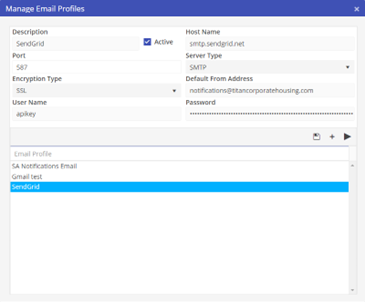
Email Profiles
The Sourcing Option allows for multiple Email Profiles. This will allow emails to be sent from multiple accounts which could be associated with different companies. Or, specific emails may be grouped with a specific Email Profile.
Before emails may be sent from the Sourcing Option, at least one Email Profile must be created.
IMPORTANT: Emails are sent from the Sourcing Options tool when the user selects the send option. Multiple Orion Users may be sending at the same time. Most email providers limit concurrent connections to the server to 3 or less. This means that if multiple users are sending at the same time, the last connection(s) might be denied. Unfortunately, continuing this process could cause your email provider to suspend your account as they see this as spamming.
For sending multiple emails at the same time Software Answers suggests using a Transactional Email Service. Transactional Email Service allows multiple emails to be sent at the same time. There are lots of companies that offer transactional email service coinciding with your own accounts. This would permit the recipients replies going directly into your regular email.
To get to Sourcing Options Email Profiles, click on a Sourcing Option Email Template, then on Manage.
Select an existing Profile, or create a new Profile