
Frequent Scenarios
The following are some scenarios that you might encounter and actions that you may take to correct them.
(Examples are from the Ops Recap Report)
· Unit contains a contract for the financial period and a UDC service line for rent.
Result: Zero dollars is pending, posted or paid.
Why: There are no reservations for the period.
Action: None
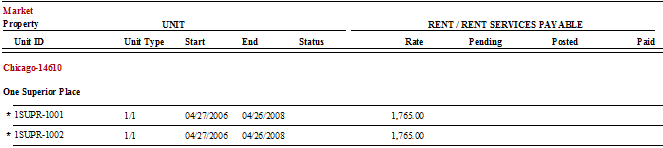
· Unit appears on the report but the start and end dates report as NULL for the financial period.
Result: There is no rate and 00.00 dollars is pending, posted or paid.
Why: There is a reservation for the period for 10 days in the period.
Note: This unit is displayed because there is a reservation for the period.
Action: The unit contract must be updated in order to display the apartment rent rate. This will allow the application to calculate how much rent is pending.

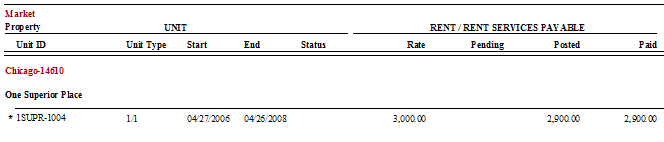
· Unit contains a contract for the entire financial period and a UDC service line for rent.
Result: Rate = $3,000, Pending = $00.00, Posted = $2,900, Paid = $2,900
Why: Reservations for the period equaled 29 occupied days for June. The daily rent rate is $100.00 x 29 occupied reservation days.
Action: None
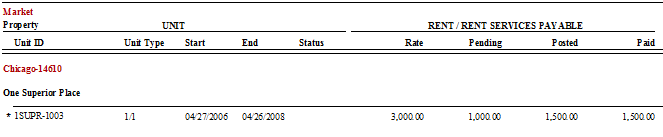
· Unit contains a contract for the entire financial period and a UDC service line for rent.
Result: Rate = $3,000, Pending = $1,000.00, Posted = $1,500, Paid = $1,500
Why: A reservation for the period equaled 15 occupied days for June. Later during the same month another reservation was added or the existing reservation was extended for 10 days.
Note: The application will automatically calculate the pending amount that is due for rent as soon as the new reservation or extension is entered into Oscar.
Action: Post the pending amount through the A/P Batch payments routine.
· Unit contains a contract for the entire financial period and a UDC service line for rent.
Result: Rate = $3,000, Pending = -$100.00, Posted = $2,900, Paid = $2,900
Why: Rent originally paid for arrival / departure dates, 6/1-6/29. Reservation departure date changed to 6/28. This equates to one (1) day of property rent overpayment.
Note: Departure dates are not displayed on this report, only Bill To dates.
Action: If you are due a rent credit, a ‘one-time’ rent service credit for -$100.00 must be added to the UDC. The service date for this credit must be an occupied date in that financial period.

· Unit contains a contract for the entire financial period and a UDC service line for rent.
Result: Rate = $3,000, Pending = -$1,500.00, Posted = $3,000, Paid = $3,000
Why: Rent originally paid for two reservations with the following arrival / departure dates, reservation (a) 6/1-6/15 and reservation (b) 6/15-6/30. Reservation (b) gets cancelled.
Note: Cancelled reservations that have been invoiced are displayed on this report with 0.00 in the A/R Rate column.
Action: If you are due a rent credit, a ‘one-time’ rent service credit for $1500.00 must be added to the UDC. The service dates for this credit must be occupied dates in that financial period.
