
Generate ACH File
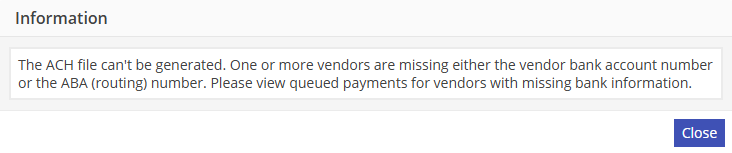
On clicking this command, the system will check to make sure that all vendors to be included in the file contain an entry for both vendor bank account number and ABA (Bank ID for routing). If not, the system will display the below message directing the user to view the queued payments screen, which indicates if vendors are missing data in either of these fields.
If the required vendor bank data is present, the system will generate the ACH file per the instructions in the custom application, and allow the user to specify a location to save the file. The system will provide a unique name for the file consisting of ‘ACH ‘ + -the bank chart of accounts id + -the date (yyyymmdd) + -the time (hhmmss-with no colons). Note that when the ACH file is generated, it will include all payments that are in the queue regardless of when they were added to the queue.
Once the file is saved, the system will display a message for the user to indicate whether or not the file was generated correctly. Ideally, the user should submit the file to the bank using the bank’s required upload method and receive confirmation that the file is acceptable before indicating that the file was generated correctly.
Once the user indicates the file is correct, all payments will be marked as released in the general ledger. Released payments will no longer be available in the queue, and may not be “unreleased.” If the user indicates the file was not generated correctly, the payments will remain in the queue and will not be marked as released.
A batch id will be generated for the file and stored in a header table, and the batch id and the individual ledger lines will be stored in a detail table. This will provide the ability to generate summary reports of ACH payments per batch at a later date.
The system will then give the user the opportunity to “Print Vendor Payment Vouchers” for the ACH file. The system will use the report setup in the custom application for this. Note that it will not be possible to print vendor payment vouchers for a batch at a later point. However, it will be possible to run a summary report of the file at any time.