
Program Settings
To access the settings, navigate to Program Settings > Reservations > Transfer
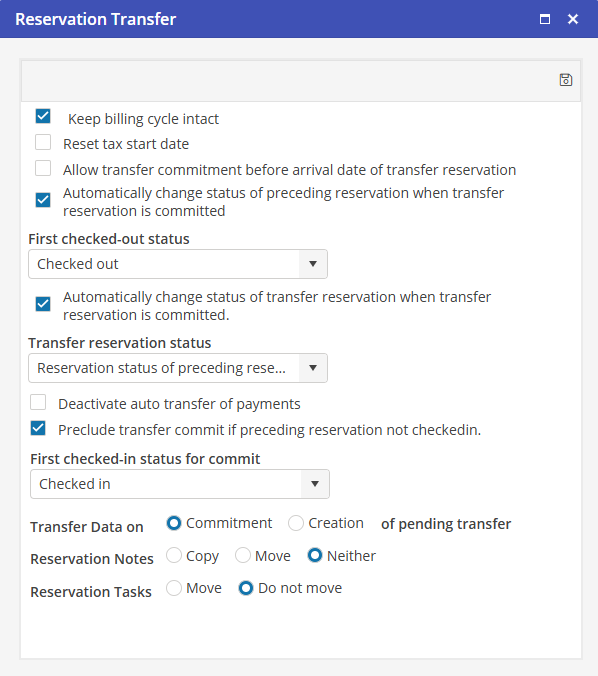
Keep billing cycle intact
Selecting this option will maintain the billing cycle of the preceding Reservation on the Transfer. The billing cycle will start on the original Bill From date, not on the Bill From date of the committed Transfer.
Reset tax start date
If this option is populated, the Transferred Reservation’s taxes will calculate from the arrival date of the transferred Reservation. If this option is not selected, the tax start date will be calculated from the original Reservation arrival date. This option is also available for selection on the Transfer screen.
Allow Transfer commitment before arrival date of Transfer Reservation
If this option is populated, a Reservation may be committed prior to the arrival date. If this option is not selected, a Transferred Reservation may only be committed on or after the arrival date of the Reservation.
Automatically change status of preceding Reservation when Transfer Reservation is committed
Populating this option will automatically change the status of the preceding Reservation to the First checked-out status, selected below, when the transfer is committed. This feature will only work if the arrival date of the committed Reservation is today or earlier. The checked out (res status 2) box will auto populate as well.
First checked-out status
Select from the Reservation statuses available the status desired for the Preceding Reservation. This will be used with the preceding process.
Deactivate auto transfer of payments
Populate this indicator to stop the auto transfer of payments to committed transfers. When a Transfer is committed and the originating reservation contains payments, the credited portion of the payment will not move to the Transferred Reservation. This option is unpopulated by default.
Preclude transfer commit if preceding reservation not checked in
If the reservation status is less than the selected “First checked-in status for commit”, the User will not be able to commit the pending transfer.