
Quoting and Billing in Non-Base Currency - Using Rent Builder
Using rent builder allows for viewing both the base and non-base currency amounts based on the exchange rate at the time of booking the reservation as well as the current exchange rate.
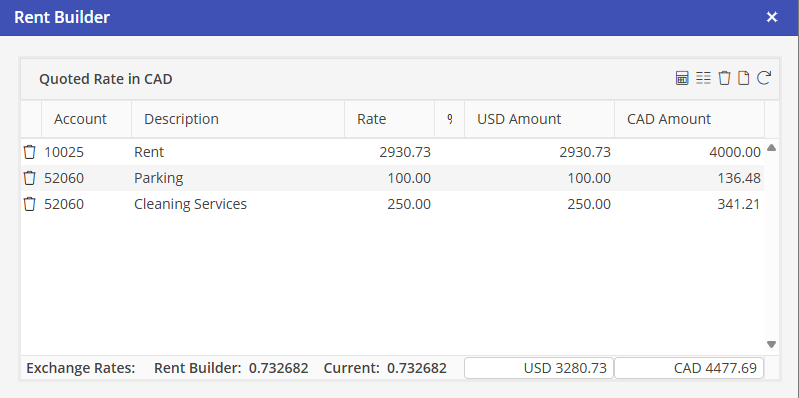
In the above example, the guest is being invoiced in Canadian dollars (CAD). The exchange rate at the time of booking is displayed as well as the Current Exchange rate. The system will use the exchange rate for invoicing based on the default currency exchange rate setting in Program Settings > Financial > A/R Charges > Multi-Currency.
For the above example if:
1. Use rate in effect at the time of invoicing (Default-Dynamic) is selected; the guest will be invoiced 4477.69 CAD and the G/L posting in USD will be based on the Current Exchange rate 0.732682. The invoiced amount may change depending on the fluctuation of the exchange for each financial period.
2. Use rate in effect at time of booking (Static); the guest will be invoiced 4477.69 and the G/L posting in USD will be based on the Rent Builder Exchange rate (stored rate). The invoiced amount for each financial period will not change.
Transferred Reservations : When option “use rent rate from preceding reservation” is selected, the exchange rate from the previous reservation will be stored for the transferred reservation. Option “Use default rent rate for unit”, the exchange rate in effect at the point of commitment will be used and the exchange rate will be used based on the A/R Billing Multi Currency program setting.
Multiple Rates : Exchange rates will be used based on the A/R Billing Multi Currency program setting.