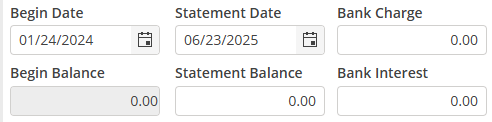
Reconciliation Header
The reconciliation header detail must be completed and saved before proceeding to the reconciliation process.
Begin date
The Begin Date will auto populate with the date after the last Statement Date. The initial reconciliation will allow editing of this field. Consecutive reconciliations will not allow editing of this field.
Statement Date
The Statement Date is the Through Date on the bank statement. Manually enter the Ending Date on the Bank Statement.
Begin Balance
The Begin Balance will auto populate with the amount of the Statement Balance of the prior reconciliation. The initial reconciliation will allow editing of this field.
Statement Balance
The Statement Balance is the balance as of the Through Date on the bank statement. Manually enter the Ending Balance on the Bank Statement.
Bank Charge
Any lump bank charges that appear on the statement may be entered here. It is recommended that returned checks be added as separate Journal Entries.
Post Date
If Bank Charges are entered, this field will appear. The date will default to the Statement Date. Change as necessary.
Post Period
If Bank Charges are entered, this field will appear. The period will default to the current period. Change as necessary.
Bank Interest
If bank interest was earned, enter here.
Post Date
If Bank Interest is entered, this field will appear. The date will default to the Statement Date. Change as necessary.
Post Period
If Bank Interest is entered, this field will appear. The period will default to the current period. Change as necessary.
Choose  after the Bank Reconciliation Header detail is complete.
after the Bank Reconciliation Header detail is complete.