
Trial Balance
In order for Orion to Report accurate account Balances, the Beginning Balance Trial Balance must be entered using the following method.
The sum of all bank accounts will be entered into a Bank Contra Account which will be used as a clearing account. Only one Contra Account is required. Create a single Bank Contra Account, with the Type selected as Standard.
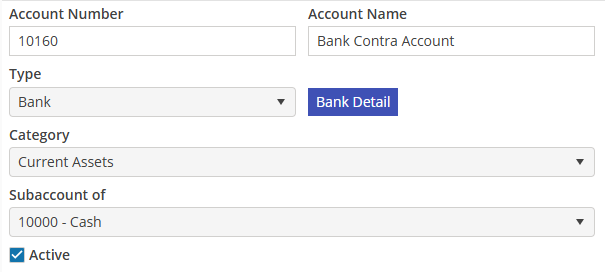
Print the trial balance from the old application as of the last active date; this will be used to create all beginning balances in Orion. Example: if your Orion “Go Live” date is 1/1/2026, then the Trial Balance should be run for period 2025.12, or as of 12/31/2025.
Create a new Journal Entry in Orion that posts on the last active date in the old application. Example: the period is 2025.12 and the Posting date is 12/31/2025.
Using the Trial Balance, select the corresponding general ledger account in Orion. Enter the Ending Balance amount in the correct column; debit or credit. Do not enter individual bank balances into bank accounts. The sum of all bank accounts will be entered into the Bank Contra Account created above.
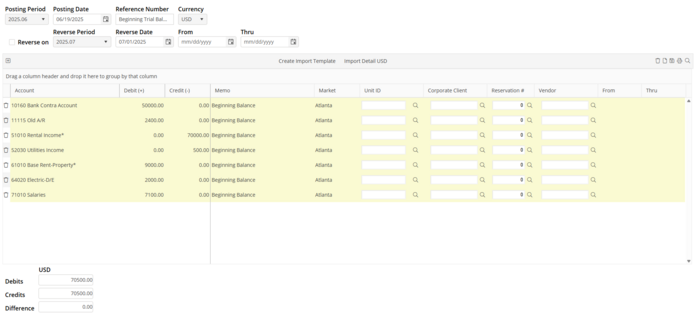
After all accounts from the Trial Balance have been entered on the Beginning Balance Journal Entry, verify that the Difference is zero.
Select  to save the Beginning Trial Balance Journal Entry.
to save the Beginning Trial Balance Journal Entry.If this is a new business and no Trail Balance exists, create a General Ledger account called “Beginning Balance” in the Equity category. To get the beginning bank balance, credit this account and debit the bank account.