ACH Void Process
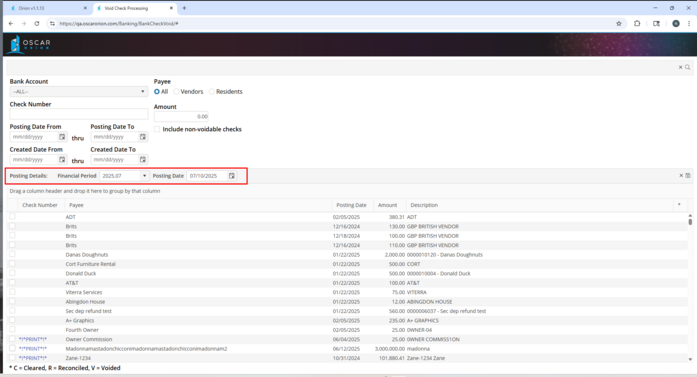
ACH transactions may be voided in the system. To Void an ACH transaction, access the Void Check Processing screen under Banking > Void Processing.
Filter Options
Find a specific ACH transaction by using any of the other filters available.
Bank Account : Select the Bank Account associated with the ACH transaction to be voided.
Include non-voidable checks : If transactions are not returned in the screen, this indicates that they are unable to be voided. Some reasons that an ACH transaction may not be voided is that it has been cleared in a Bank Reconciliation or it has been reconciled in a Bank Reconciliation. Populate this option to include transactions that may not be voided.
Retrieve : Use the  icon in the upper right hand corner to retrieve.
icon in the upper right hand corner to retrieve.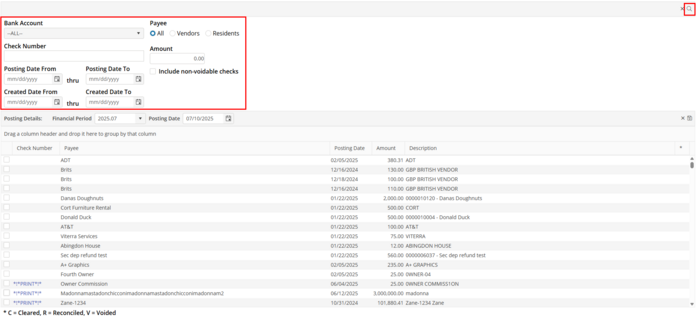
Checks
Select ACH transactions : Populate the line item(s) to be voided. Multiple items may be selected for voiding at the same time. At any time, click on the check number in the Check No column to see the ACH detail.
Posting Details
Financial Period : Select the Financial Period for the Void posting.
Posting Date : Select the Posting Date for the Void Posting.
Post Voids : To post the Void, select “Post Voids”.