
Create a Unit Direct Cost Line
An alternative to creating a Payable is creating a Unit Direct Cost line (UDC) for the Security Deposit to Property amount. Prior to creating the UDC, verify that a Service Type has been setup for Security Deposits to Property. If paying Utilities or Pet Deposits through this method, a separate Service Type and Account MUST be setup for each type of Security Deposit.
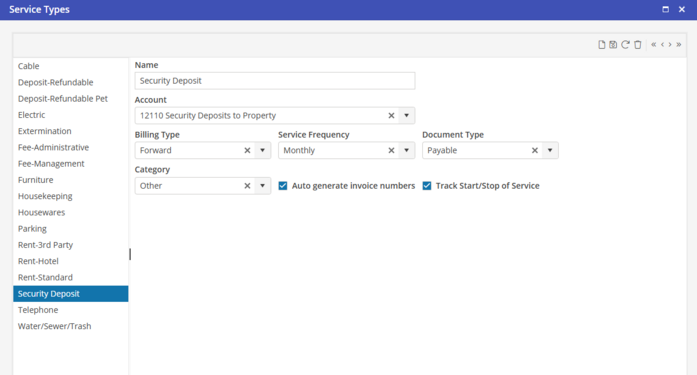
Service Type
Even though this is a single time charge, a Service Frequency must be selected on the Service Type. Select Monthly here. Upon creation of the UDC, One Time will be selected.
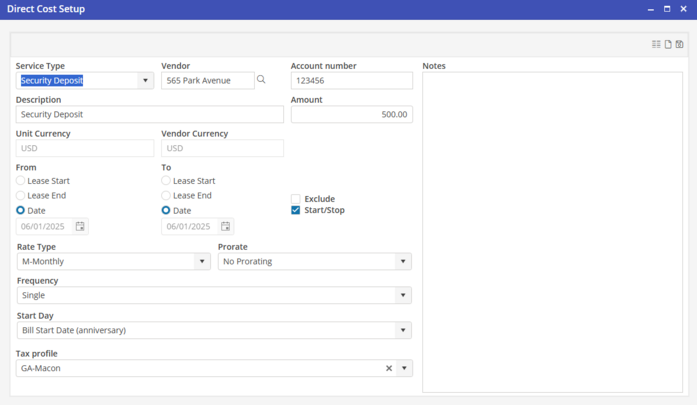
Create the UDC on the Unit
1. Select the Service Type, Deposit Refundable.
2. Select the Vendor associated with the Unit.
3. Type in a Description.
4. Type the Amount of the Security Deposit.
5. The From date will auto populate with the Contract start date. If the Security Deposit needs to be paid prior to the start of the contract, select a date in the prior Period.
6. Change the Rate Type to P-Package, and Frequency to Single, to make it a one time charge.
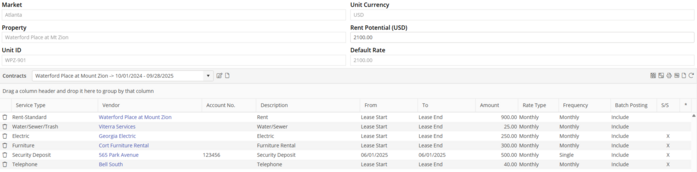
The Projected profit calculation will be included in the Monthly Total in the From date of the Security Deposit.
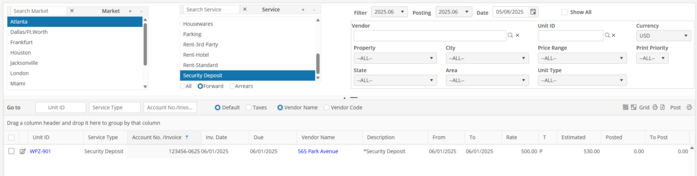
Posting the UDC through the Batch Posting process
1. Select the Posting Period associated with the From date of the Security Deposit.
2. Select the Market, or all Markets
3. Select the Service Type “Security Deposits”
4. Populate all Security Deposits to be paid.
5. Post