Return Posting Instructions
The original Payable to the Property MUST have the "Security Deposit to Property" account selected on the payable and it MUST include the Unit ID.
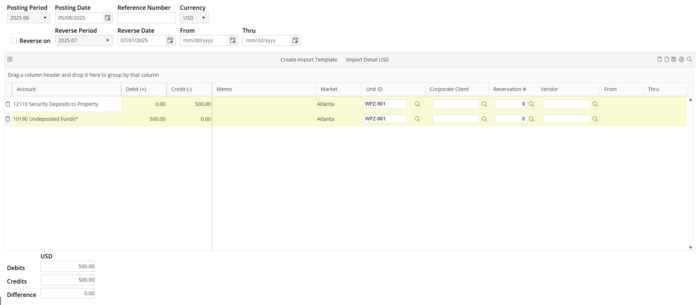
Upon receipt of refund from the property, the Journal Entry MUST credit the "Security Deposit to Property" account and Debit the “Undeposited Funds" account. The Journal Entry MUST include the Unit ID and the Vendor ID which is located at the far right of the Journal Entry Screen. Use the scroll bar at the bottom of the screen.
Failure to provide the "Security Deposit to Property" account, the Vendor, AND the Unit ID on BOTH the Payable and Journal Entry will cause incorrect Reporting. This Report will work for any type of security deposits paid (utility, pet, etc.) as long as an account is setup for the deposit type.
Refund LESS Final Costs and/or damages
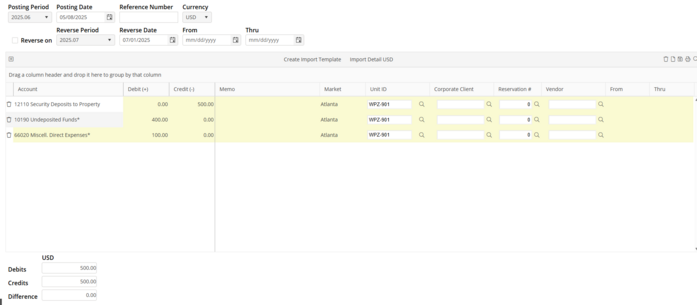
A refund of $500.00 is expected from the property. A refund of $400.00 is received, along with a notice of a “damages” charged in the amount of $100.00.
Credit the FULL refund amount $500.00 to the “Security Deposits to Property” account. Select Vendor and Unit ID’s.
Debit $100.00 to the “Damages” expense account. Select Vendor and Unit ID’s.
Debit $400.00 (the amount refunded) to the User’s cashier account. Select Vendor and Unit ID’s.
POST