
Detail
The report is ordered by Market, by Reservation Type and Reservation number and reports the following details:
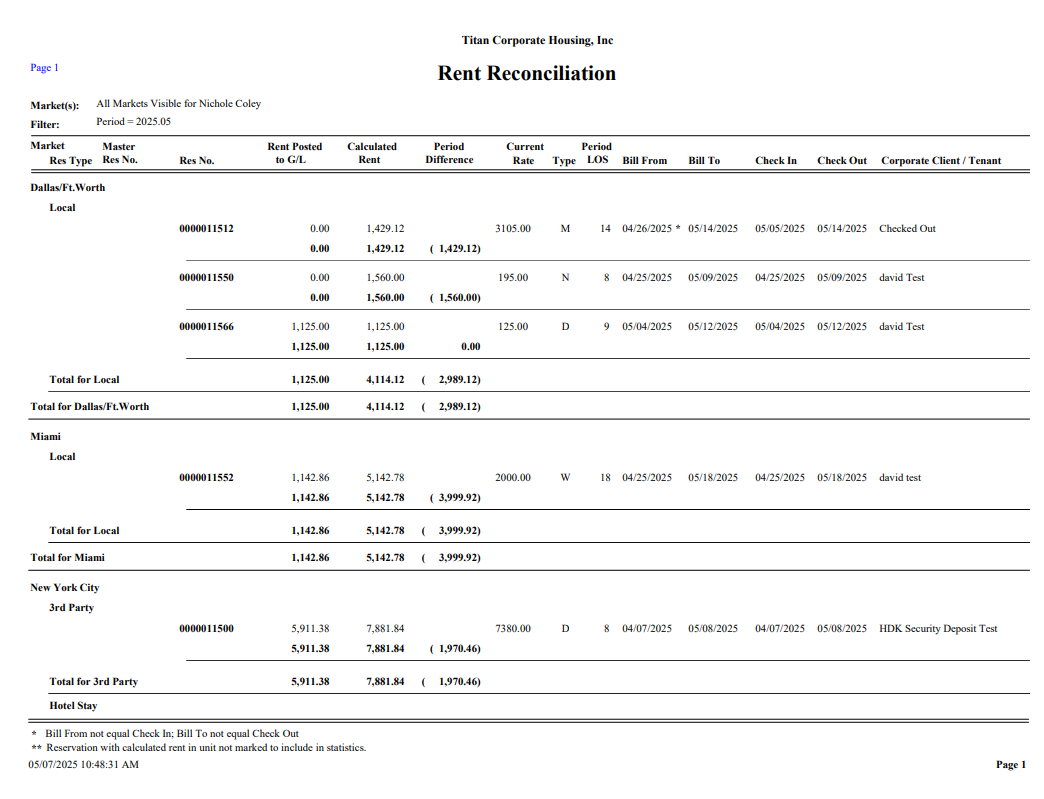
Res Number - Reservation numbers for the period that contain Bill From and Bill To dates within the Financial Period selected.
Rent Posted to G/L - General Ledger postings for Rent Revenue that have been invoiced for each Reservation for the period. This includes Rent and Credits
Calculated Rent - What is expected to invoice for Revenue accounts selected to include in ADR. The sum of all Resident Ledger lines for the period. This does not include credits.
Period Difference - Difference of Rent Posted to the G/L and the Calculated Rent.
Current Rate - Rent Rate from the Resident Ledger at the time the Rent Reconciliation is run. On a ledger with Multiple Rent Rates, this will show the weighted average. Cancelled Reservations will show a zero, even if there is a Rate in this field on the Resident Ledger. Reservations that contain no Ledger Rent lines for this period will also show as a zero.
Type - Rent Rate Type (D-daily, N-nightly, M-monthly, etc.)
Period (LOS) - Number of billing Units based on the Reservation Bill From/Bill To dates and Rate Type
Bill From - Bill From date from the Reservation
Bill To - Bill To date from the Reservation
Check In - Arrival Date from the Reservation
Check Out - Departure Date from the Reservation
Corporate Client/Tenant - From the Resident Ledger An asterisks (*) displayed on a Bill From and/or Bill to date means that the date is not equal to the Check in or Check Out respectively. Two asterisks (**) displayed next to the Reservation number indicate that this Reservation is booked in a non-statistical unit and contains a non-zero calculated rent.