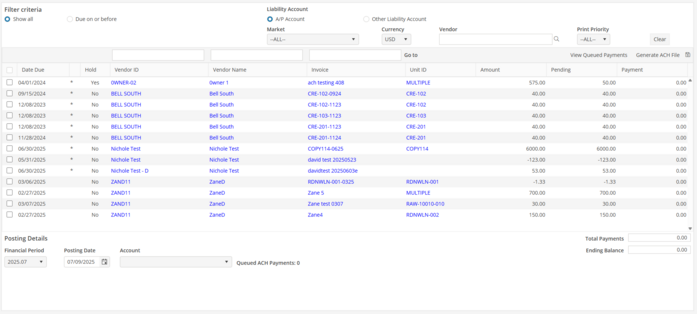
Filter Criteria
Show All/Due On : Defaults to “Show All” (reports all pending posted payables). Select “Due on or before” and choose any date in the future.
Liability Account : The Liability Account defaults to the standard system A/P Account. Choose Other Liability Account to select a different liability account if necessary.
Market : Specify the Market or select -ALL- for all Markets. Defaults to User’s Default Market.
Currency : Defaults to the Base Currency of the Oscar Enterprise database. Select a different currency if required.
Select Vendor : Drop down and select a Vendor. Selecting the Vendor marks all payables for that specific Vendor.
Print Priority : Select the print priority. Selected on the Vendor record, this feature allows the User to process outstanding payables in order of priority. Choose 1-9. Example: Rent could be a priority 1, or a 9 based on the companies priority levels.
Payment : Simply check the box in the left hand column to select the total amount for payment. If paying less than the payable amount, type in the amount in the “Payment” column.
Select All : Clicking here selects all payables in the ACH Processing Screen for payment.
Select None : Clicking here deselects all payables in the ACH Processing Screen for payment.