
Filtering
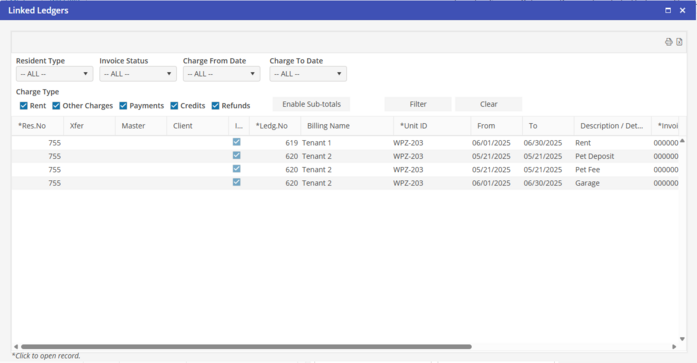
The Linked Ledgers screen will contain the following filter options:
Resident Type (All, Corporate Client, Individual; default = All)
Invoiced Status (All, Invoiced, Not Invoiced; default = All)
Charge Date From (default = current date)
Charge Date Thru (default = current date)
Charge Type (All, Rent, Other Charge, Payments, Credits, Refunds)
Charge Type filters include: Rent, Other Charges, Payments, Credits, and Refunds
If the additional option to “Enable Sub-totals” is selected, the user will have the option to sort and total as follows:
-
By Reservation / Resident ID
A total line will display at the end of each resident id. The total will be the sum of all ledger lines displayed per the selected filters.
-
By Resident Billing Name
A total line will display at the end of each resident name. Again, the total will be the sum of all ledger lines displayed per the selected filters. If the same resident name is associated with more than one ledger or more than one reservation, the total will be the sum of all the ledger lines for the resident name, grouped first by currency.
Once you have made your filter selections, click “Filter” to populate the grid below. The option to print/preview or export the data contained in the grid is available. The sorting will be the same sorting per the grid. Print the Linked Ledger which will act as a summary statement for associated Multi-Reservation Tenancies.
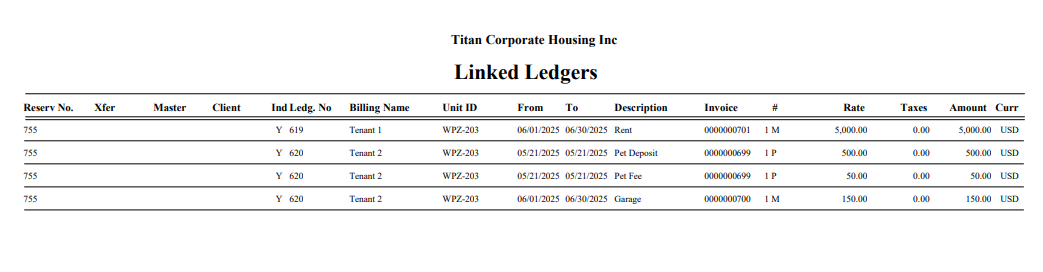
Note that the Xfer and the Master fields are indicators as to why the reservations are linked. Drill-down capability is available for the data in the columns that contain an asterisk (*). Click on a detail in the grid to access the record selected. After reviewing the data, close the accessed screen.