
Payable Filters
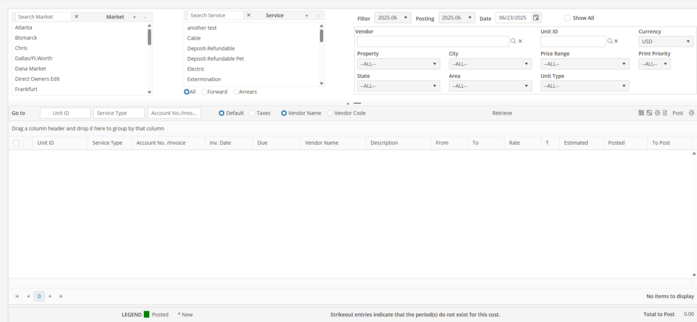
Filter Period : Defaults to current period/month. Retrieves UDC lines that contain dates that fall within the selected period. For Forward Services, all payables where the “From” date is in the selected period. For Arrears Services, all payables where the “To’ date is in the selected period. If a future Filter Period is selected, the Posing Period will automatically update to match. Posting Period Defaults to current period/month. Sets the posting period for all payables posted in the batch. Select a previous closed Filter Period and post a previous periods expenses to the current period.
Posting Date : Defaults to Windows system date. The Posting Date sets the posting date for all payables in the batch.
Show all : When “Show all” is populated, current period payables previously posted through the Batch Posting process appear highlighted in green. If the UDC line was underpaid initially, additional postings may occur until the pending “To Post” amount has reached zero.
Market : Select a Market. To select multiple Markets use the ‘Ctrl’ key while selecting with the mouse. At least one Market needs to be selected. Use + to select all, or - to deselect all.
Service : Select a Service. To select multiple Services use the ‘Ctrl’ key while selecting with the mouse. At least one service must be selected. Use + to select all, or - to deselect all.
Forward/Arrears : The Forward/Arrears filter defaults to All. To list only forward or arrears-type postings, select the corresponding type.
Vendor : Select a specific Vendor if required. Clicking on the Vendor name field will open the Vendor search screen. If the Vendor is not in the base currency, the Currency filter on the Batch Posting screen will update with the Vendor’s currency. Hovering over the Vendor filter after a Vendor has been selected will display the Vendor ID and the Vendor Name.
Unit ID : Select a specific Unit if required. Clicking on the Unit ID name field will open the Unit search screen.
Currency : Select a Currency if required. Only UDC lines that match the currency selected will be returned.
Filter Criteria : Filters default to –ALL--. To post service type payables for a specific Unit Filter, select the desired criteria using the pull down menus. After all filter criteria have been entered, click retrieve to return the requested UDC lines. If any of the filter criteria is changed, the retrieve button will reappear.