Units
At a glance, the Unit IDs, Statuses, Contracts, and Reservation Statuses can be viewed.
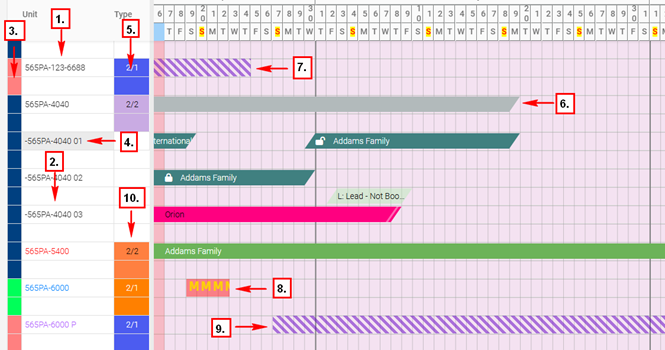
1. Unit ID
2. Color text indicates that the Unit is Active (Black), On notice (Red), 14NTV (Blue), or Inactive (Purple) – setting within the Unit > Information
3. Unit Status displayed to the left of the Unit ID – setting within the Unit > Criteria > Condition
4. Subunit - Dash in front of Unit ID indicates a Subunit
5. Displays Unit Type – setting within the Unit > Criteria > Unit Type
6. Gray indicates Subunit Reservation on Main Unit
7. Unit Contact Start Date on the 24th
8. Unit Status on Maintenance from the 19th through the 22nd
9. Unit Contract End Date on the 27th
10. Unit Type Source, indicated by color – Setting within Unit > Criteria > Source