
Vacancy Projection
This report is located under Management > Unit > Unit Vacancy Projection. The Vacancy Projection Report provides a listing of the total number of Units for each Unit type (studio, one bedroom, two bedroom, 3 bedroom, and other) * that are available to rent on each day of a selected date range. In this report, a Unit that is available to rent on a particular day is designated as “vacant.”
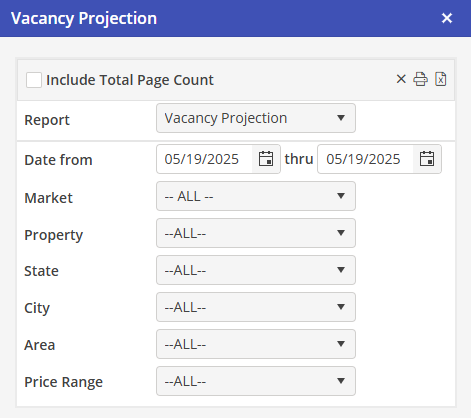
Report Criteria
Using all, none, or a combination of the system filters in the Report Criteria section, the User can create a comprehensive Vacancy Projection report.
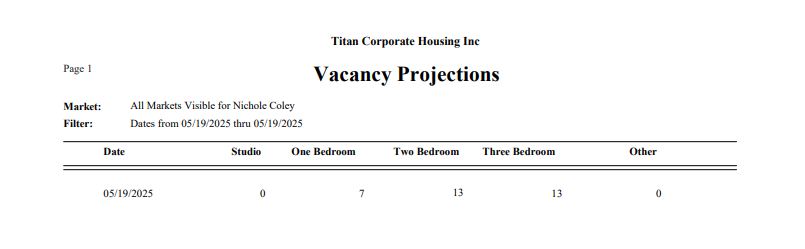
The number of vacant Units on a particular day is calculated as the sum of Units available on that day minus the sum of Units “occupied” on that day.
A Unit is considered as available to on a particular day when the following criteria are met:
-
The Unit is marked to include in statistics
-
There is a contract for the Unit on that day
-
The Unit does not have a “blocked” Unit status type on that day
For the purposes of this report, a statistical Unit is considered as occupied from the arrival date of a Reservation in the Unit until the day before the departure date plus the number of “days between Reservations” specified in Settings \ Markets for the Unit Market.
For example, if the number of days between Reservations is 0 and the departure date is 1/31/08, the Unit is not considered as occupied on 1/31/08 (i.e., it is available to rent). The last day of occupancy is 1/30/08.
If the number of days between Reservations is 1, the last day of occupancy is 1/31/08 (1/30/08 plus 1)
*Note that the Unit types used for this report are the same Unit types that are mapped to studio, one bedroom, two bedroom, and three bedroom for the Comparative Statistics Report. (Any Unit types that are not mapped to one of these types are considered to be an “other” Unit type.)
Access / Security
Users who have security for Reports / Operations may access the report from the Oscar navigation bar in the Management section.
Ordered By
The report will be ordered by date.
Filters
-
Date From–Date Thru Calendar controls; Default = current date
-
Market Dropdown containing list of Markets; Default = ALL
-
Property Dropdown containing list of properties; Default = ALL
-
4 User Defined Unit Filters Four dropdowns containing lists for each User defined Unit filter; the default for each = ALL
Report Fields
-
Date: There will be a date for each day in the selected date range
-
VacStudio The number of days that studio Unit types are vacant on the date
-
Vac1BR The number of days that 1 bedroom Unit types are vacant for the date
-
Vac2BR The number of days that 2 bedroom Unit types are vacant for the date
-
Vac3BR The number of days that 3 bedroom Unit types are vacant for the date
-
VacOther The number of days that other (non-mapped Unit types) are vacant for the date
Options
Users will have the option to Print, Preview, or Export the report. Headers and footers will be provided in the Print and Preview versions only.