Viewing the Report
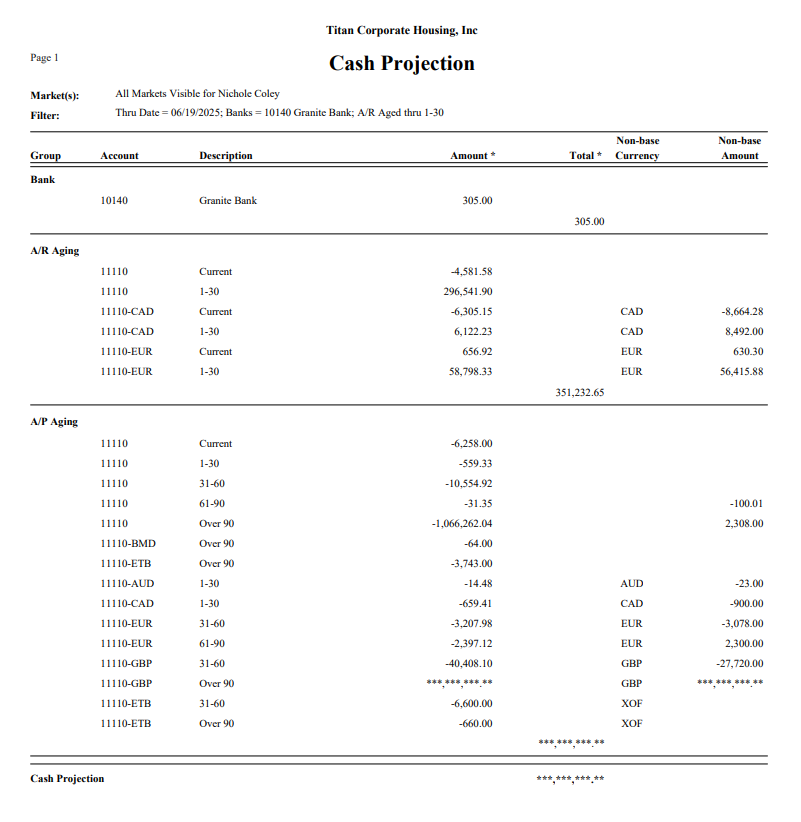
Bank : All banks that were selected on the dialog screen will be listed here. If the bank is a non-base currency bank, the non-base type will be listed along with Non-base amount.
A/R Aging : Only A/R that matches the option selected at “Include A/R Aged (as of the date selected above) for” will be included.
If the A/R Aging is in a non-base currency, the non-base type will be listed along with Non-base amount.
A/P Aging : All A/P aging will be returned, regardless of age. If the A/P Aging is in a non-base currency, the non-base type will be listed along with Non-base amount.