
Changing a Booked Reservation to a Priority Reservation
Any Reservation may be changed to a Priority Reservation by a user with access to do so by populating the Priority indicator on the Unit tab and saving the Reservation. After populating the Priority Reservation indicator, verify that the Reservation contains a Market, a Property, and a Unit Type.
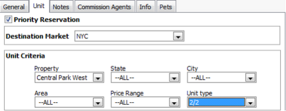
After saving the Priority Reservation, the Reservation will move to a Virtual Unit on the Schedule Board for the associated Property.
The Priority Reservation functionality will be enabled if there is no Financial Activity associated with the Reservation, or if there is, the "Automatically move revenue to new unit (Journal Entry)" or “Automatically move all financial postings to new Unit” setting is populated in Program Settings and the Reservation is not part of a multi-reservation tenancy.
At the point a reservation is changed from a regular to a Priority Reservation, the following will occur:
1. The reservation will be dissociated from the actual unit, but will maintain the market and property of the unit.
2. The status of the reservation will change to the "Priority Reservations Status" per Program Settings.
3. Any financial activity will be moved from the actual unit to a virtual unit via journal entries.