
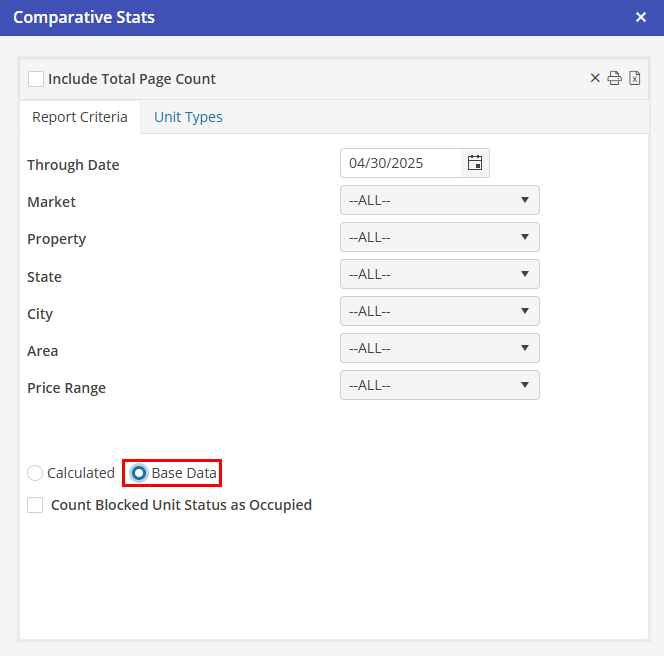
Comparative Stats Base Data
The application gathers the following base data for the dates as described above for the various unit type breakdowns (and any other filters selected):
Unit Available Days Total
This is the total number of days in the date range for units that are marked to include in statistics and that have active lease contract dates, regardless of whether the unit is active or inactive. Both the start lease day and the end lease day are included in the calculation for unit available days.
Occupied Days Total
This is the number of days for which there are reservations in units that are marked to include in statistics. For units with sub units, if there is a reservation in the main unit or in any of the sub units, the unit is considered occupied. Note that if there is more than one reservation for the unit (i.e., two sub units each have a reservation for the day), this counts as only one occupancy.
If the default ‘Rate Prorating’ setting is set to “By Night,” the departure day for a reservation in the unit is not included in the occupied days total (unless there is at least one resident ledger for the unit that has rent with a “Daily” rate type). In these cases, the last day included in the occupied days total is the previous day.
Note that a unit that is not considered available (i.e., does not have a contract) may have a reservation (thus, occupied days) associated with it. This can (but does not always) result in an occupancy percent figure that is over 100%.
If a package rate is used for rent, or a reservation has no rent paying ledger, all days are counted as occupied. A single Reservation with multiple ledgers on any given day counts as one occupied day.
When using the Transfer Module and a resident is transferred from one unit to another, the departure date of the first reservation equals the arrival date of the second reservation. Technically, two units are “occupied” on this day. However, because the same resident is in both units on that day, it does not make sense to count that resident twice for occupancy.
For determining the number of occupied days in these cases, the departure date of the reservation in the first unit is considered as the day before the actual departure date. This prevents the same resident from being counted twice on the actual departure date.
Rental Revenue Total
Rental revenues are calculated from the Resident Ledger lines created from the “bill from” and “bill to” dates for Rent charges, regardless of whether or not those charges have been invoiced yet. Manually added “other charges” posted to rent accounts are not included in the rental revenue figure.
Note that revenue may or may not be generated for the bill to date as follows:
Default prorate type in settings is “By Night”
For monthly, weekly, or nightly charge types, no revenue will be generated for the bill to date.
For daily charge types, revenue will be generated for the bill to date.
Default prorate type in settings is “By Day”
For nightly charge types , no revenue will be generated for the bill to date.
For all other charge types, revenue will be generated for the bill to date.
A Daily Rate (DR) is calculated for rent for every resident ledger for the day for both units and sub units that are marked to include in statistics. The base rates used for this calculation (for all figures except the budget figure) are the rent rates that are automatically generated by Oscar from the Resident Ledger lines created from the “bill from” and “bill to” dates for Rent charges.
When using the Transfer Module and a resident transfers from one unit to another, if an invoice has been generated on the first reservation that includes charges for dates on the second reservation, at the point of committing the transfer, those charges are added to the second reservation and credits for them are automatically generated on the first reservation.
If these credits are not included in calculating revenue, revenue will be overstated. All statistics reports automatically include transfer credits for rent in calculating projected rent revenue.
Additionally, a filter option is available on the Daily and Comparative Stats reports to include all rent credits if desired.
The budget figure is the sum of amounts entered into the budget module for all accounts that have been selected as ADR accounts in the financial settings section of Oscar.
Monthly Rate
Previously, statistics used the default prorate formula selected in Settings to calculate a daily rate from a monthly rate. For Daily Stats, monthly rates are always prorated to determine a daily rate. For Comparative Stats, a daily rate is calculated only if necessary.
The new calculations for Statistics use the number of days for the charge as the basis for converting both monthly and package rates into daily rates. This provides a more accurate figure for Daily Stats, and a much closer match between Comparative Stats and Daily Stats.
Note that changing the Rent Rate on a Resident Ledger or changing the “Bill From” or “Bill To” dates on a Resident Ledger or Reservation has an effect on the Daily Rate. However, applying credits to rent does not affect the Daily Rate and therefore does not affect ADR unless the option to “Include all rent credits” is selected.
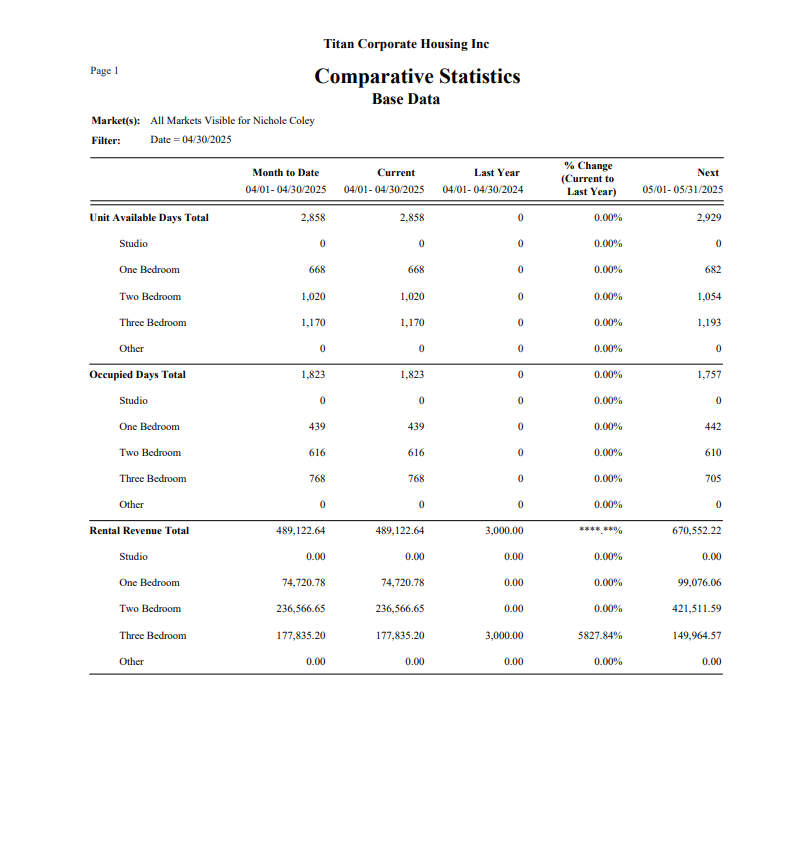
The figures on the report are for the following time frames, based on a specific selected “through” date:
Month to Date
Begin Month Date through Date Selected
Current Month
Begin Month Date through End Month Date
Budgeted Month*
Begin Month Date through End Month Date (note that budget figures are not broken down by unit type; there is only a total figure for each statistic).
*Budgeted Month is not included in the Base Data report.
Last Year Month
Begin Month Date of previous year through End Month Date of previous year
% Change
A “% Change (Current to Last Year)” percentage is provided.
Next Month
Begin Month Date of next month through End Month Date of next month