
Security Profiles
To update Security Profiles, go to Settings > Security Profiles and access the appropriate Security Profile. The Work Order security settings are located under Lists > Work Orders.
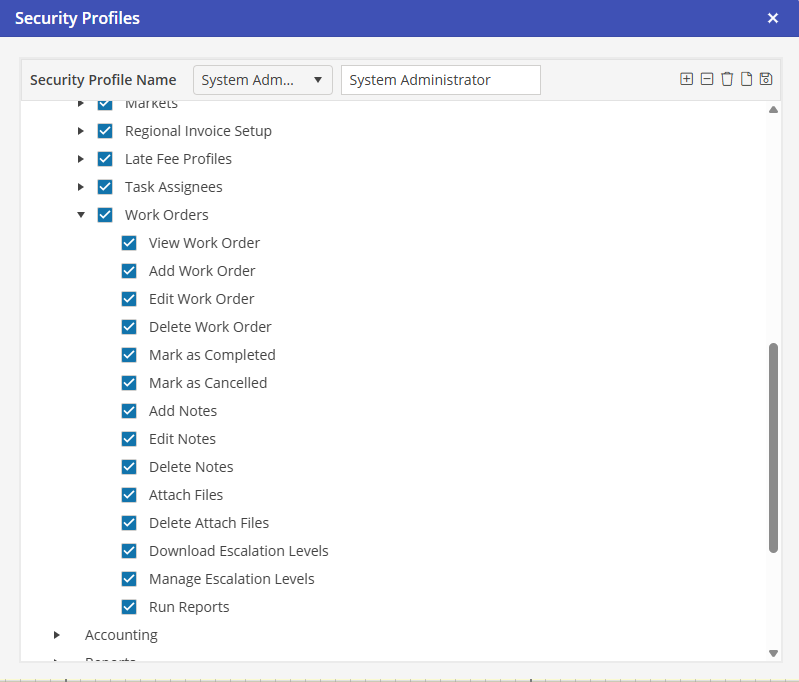
View Work Order
To view a Work Order, this access must be granted.
Add Work Order
To add a Work Order from a Reservation, Unit or Property, this access must be granted.
Edit Work Order
To edit a Work Order from a Reservation, Unit or Property, this access must be granted.
Delete Work Order
To delete a Work Order from a Reservation, Unit or Property, this access must be granted.
Mark as Completed
To mark a Work Order as completed, this access must be granted.
Mark as Canceled
To cancel a Work Order, this access must be granted.
Add Notes
To add notes to a Work Order, this access must be granted.
Edit Notes
To edit notes, this access must be granted. Software Answers recommends that only a select few have this option. If a note needs to be edited, a new note should be added.
Delete Notes
To delete notes, this access must be granted. Software Answers recommends that only a select few have this option. If a note needs to be deleted, a new note should be added.
Attach Files
To attach a file on a Work Order, this access must be granted.
Delete Attach Files
To delete an attached file on a Work Order, this access must be granted.
Download Escalation Levels
To download Escalation Levels to Corporate Clients, this access must be granted.
Manage Escalation Levels
To manage the Program Settings default Escalation Levels, this access must be granted.
Run Reports
To run reports for the Work Order module, this access must be granted.