
Send ACH Consent Capture Email
To send an ACH Consent Capture email, click  on the Credit Card/ACH Card on the Tenant Record.
on the Credit Card/ACH Card on the Tenant Record.Consent Type
Select the type of Consent desired, ACH, CC, or Both.
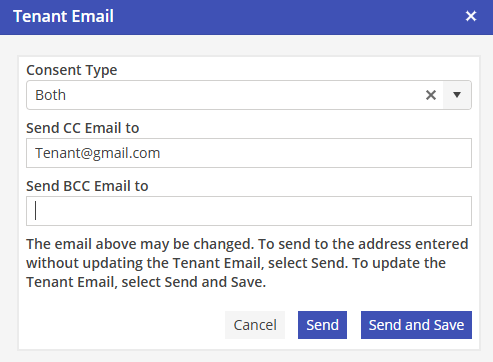
The “Send CC Email to” field will populate with the Resident Ledger email address. You may change this, if desired.
Select  to send the Consent.
to send the Consent.Select  to update the Resident Ledger Email filed with the “Send CC Email to” addresses, and send the Consent.
to update the Resident Ledger Email filed with the “Send CC Email to” addresses, and send the Consent.Once the Consent has been sent, the confirmation will appear as a banner on the top of the screen.

The Tenant Activity Log will contain an entry labeled “Consent Email Sent” on the date that the Consent was emailed, and the User that sent the Consent will also be included.

Please note: The ACH Consent Widget does not perform a pre-authorization to verify account details, as is done with a Credit Card Consent.