
Transfer Reservation Detail
All detail associated with this Transfer will be listed here. The Transfer Reservation Detail will remain after commitment, however may not be edited.
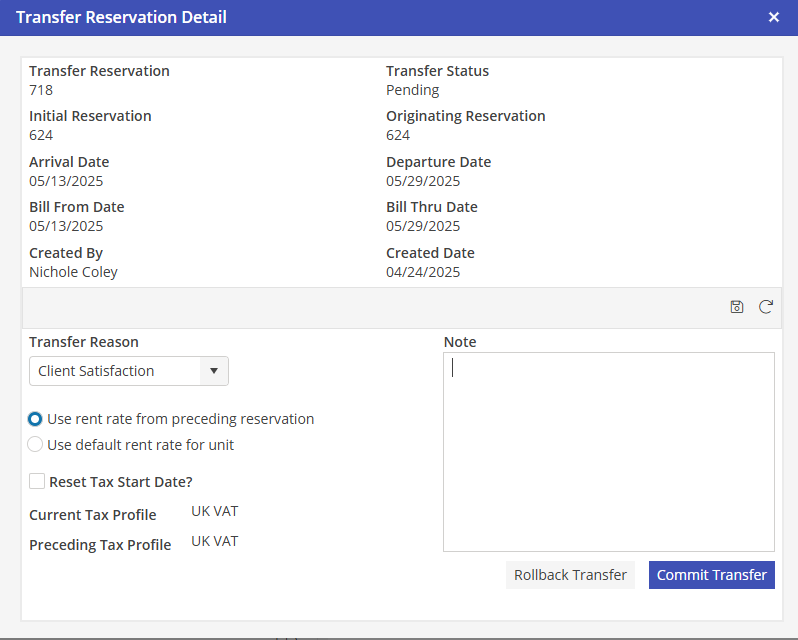
Transfer Reservation
This is the Reservation number assigned to this Transfer.
Transfer Status
This is the status of this Transfer. Options here are either Pending or Committed.
Initial Reservation
This is the very first Reservation in the Transfer.
Originating Reservation
This is the Reservation that this Transfer was created from.
Created By
The user that confirmed the Transferor created the Transfer.
Created Date
The date that that the Transfer was confirmed.
Transfer Reason
Why is the Transfer occurring? This was selected when the Transfer was confirmed.
Rent Rate
Where should the Rent Rate come from? This was selected when the Transfer was confirmed.
Reset Tax Start Date
If this option is populated in Program Settings, it will automatically be populated upon creation of the Transfer. This option may be overridden on a per Transfer basis. If the Transfer Reservation must reset their tax start obligation date, select Reset Tax Start Date.
Current Tax Profile
Tax Rate that is associated with this Reservation.
Preceding Tax Profile
Tax Rate that is associated with the preceding Reservation.